How to Empower Manual Testers to Build Automation Fast
 |
Today, the iteration pace of software development has accelerated greatly. Various organizations adopt agile, DevOps, and continuous delivery models to release software at high frequency. While manual testing remains suitable for validating user experience scenarios, relying solely on this method will slow down release cycles. Test automation has become a core capability for efficient and reliable software delivery.
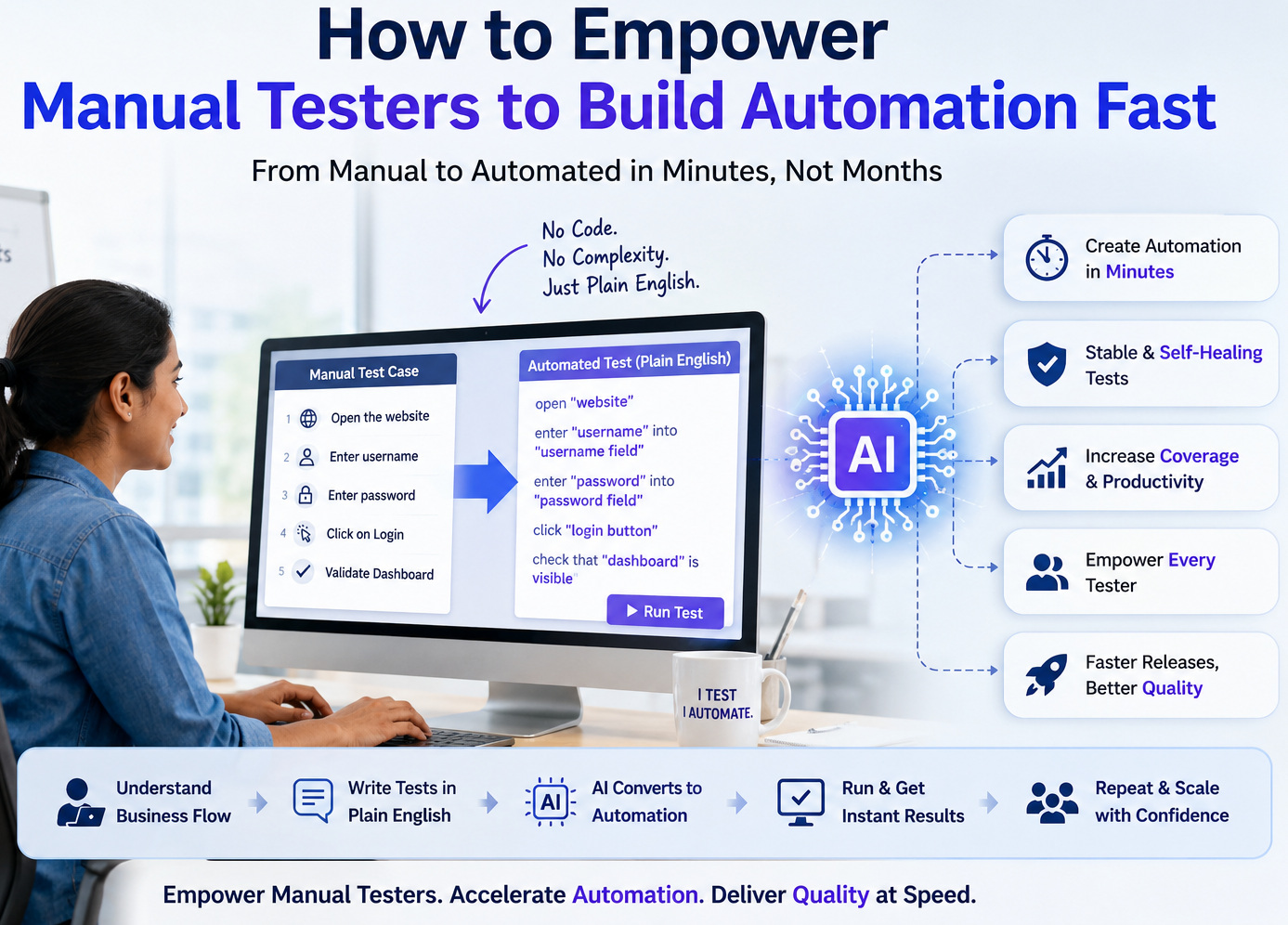
In the current enterprise software QA field, demand for automation transformation continues to climb. Most QA teams rely on manual testers who lack programming experience as their core workforce. Traditional automation frameworks require coding skills and depend on specialized engineers to function. The AI-enabled platform introduced in this paper supports testers in building automated testing processes using natural language, resolving the core challenge of automation transformation.
| Key Takeaways: |
|---|
|
Why Manual Testers Avoid Automation
Test automation has long been touted as the natural career progression for manual testers. Yet many experienced testers still hesitate to make the move. The hesitation is often mistaken for resistance to learning new technologies, but the reasons are more practical.
For example, a manual tester with 8 years of experience in testing banking applications. They understand regulatory workflows, edge cases, customer behavior, and business rules better than most developers on the team. When prompted to “learn automation,” they find out quickly that the first lessons include variables, loops, inheritance, object-oriented programming, WebDriver APIs, CSS selectors, XPath expressions, and build tools like Maven or Gradle.
Rather than leveraging their testing expertise, testers are often required to become software developers before automating any test cases. For many testers, this expectation does not align with their core responsibilities.
Read: Does Manual Testing Have a Future? Exploring Its Role in Modern QA.
The problem becomes even more apparent when organizations adopt sophisticated automation frameworks. Frameworks often require understanding project structures, page object models, helper utilities, assertion libraries, synchronization mechanisms, dependency management, and version control workflows. Before writing even a simple login test, a manual tester may need to understand dozens of technical concepts unrelated to testing itself. As a result, automation appears intimidating rather than empowering.
The Skills Gap is Often Overestimated
Many organizations mistakenly believe that manual testers lack the capabilities required for automation. In reality, they often possess most of the essential skills.
- Analyze business requirements.
- Design comprehensive test scenarios.
- Identify edge cases.
- Understand application workflows.
- Validate expected behavior.
- Report defects with detailed observations.
- Collaborate with developers and business stakeholders.
These are exactly the skills needed to determine what should be automated. The primary gap lies in how traditional automation tools expect tests to be implemented. Consider a simple manual test case: Log in using valid credentials, verify that the dashboard appears, and confirm the user's name is displayed.
driver.findElement(By.id("username")).sendKeys("admin");
driver.findElement(By.id("password")).sendKeys("Password123");
driver.findElement(By.xpath("//button[@type='submit']")).click();

WebDriverWait wait = new WebDriverWait(driver, Duration.ofSeconds(10));
wait.until(ExpectedConditions.visibilityOfElementLocated(By.id("dashboard")));

assertEquals(driver.findElement(By.id("usernameLabel")).getText(),"John");
enter "admin" into "Username"
enter "Password123" into "Password"
click "Login"
check that page contains "Dashboard"
check that page contains "John"
Both describe the same business scenario. The difference lies in the technical overhead.
Modern AI-powered platforms allow testers to focus on the business intent while abstracting away much of the implementation complexity.
More importantly, manual testers do not need to relearn how to think about testing. They already create comprehensive test cases, understand expected behavior, and identify business risks every day. Modern AI-powered automation platforms simply allow those same test cases to become executable automation. Instead of handing them over to another team for implementation, the original author can generate, understand, review, and maintain the automated version throughout its lifecycle.
Read: Manual Testing Cheat Sheet.
The Hidden Cost of Traditional Automation
- Updates to UI locators
- Dynamic page structures
- Timing issues
- Flaky tests
- Browser compatibility
- Framework upgrades
- Third-party library updates
- Synchronization problems
- Duplicate test logic
- Complex data management
For every change in the UI elements, multiple scripts need to be updated to include those updates. Let’s consider an example. Consider that a ‘Buy Now’ button ID is getting changed; this can result in failure of dozens or hundreds of test cases, giving false positive bugs and wrong test results. Then, the automation engineers must locate affected scripts, update locators, rerun tests, and verify that nothing else broke. This maintenance burden often consumes more effort than creating new automation. As a result, manual testers witnessing such maintenance activities might assume that automation is too fragile and too technical to be used widely.
Read: Manual Testing vs Automation Testing: What’s the Difference?
Why Automation Still Needs Manual Testers
- Faster Automation Creation: Manual testers are able to automate scenarios as soon as the features are ready; they don’t have to wait for a separate automation team. This greatly shortens the time from feature development to automated test coverage.
- Better Business Coverage: Manual testers know real user behavior and naturally focus on the workflows that add the most business value. This results in automation that focuses on what really matters, not just technical paths.
- Reduced Documentation Gaps: When the same person designs, validates, and automates a test, there is less information lost in handoffs. Automation reflects the original testing intent more accurately.
- Improved Collaboration: Functional validation and automation owners among manual testers can work directly with developers, product owners, and QA engineers. This will help to avoid confusion and to speed up the problem-solving process.
Reuse Existing QA Talent Instead of Hiring New Roles
Traditional automation often forces organizations to build separate teams of automation engineers while manual testers continue executing tests independently. This creates duplicated responsibilities, additional hiring costs, and communication gaps between the people who design tests and those who automate them. AI-powered automation changes this model by enabling existing manual testers to build and maintain automation themselves. Organizations can scale automation by upskilling their current workforce instead of expanding specialized automation teams, improving both efficiency and return on investment.
Skills Manual Testers Already Possess
- Business Understanding is More Valuable than Coding: Experienced manual testers know business rules, customer workflows, and edge cases that directly impact product quality. This domain knowledge helps ensure that the automation validates the correct scenarios, not just automates user interactions.
- Manual Testers Already Think Like Automation Engineers: The well-written manual test case is already a structured workflow with clear repeatable steps. Modern AI-based and low-code automation platforms allow testers to convert these logical workflows into automated tests with little emphasis on programming.
- Test Design is Already Automation Design: Manual testers typically create positive, negative, boundary, security, and validation scenarios, considering user roles and workflow dependencies. These analytical skills are what makes automation effective and are far more valuable than knowing a programming language.
Read: Hybrid Testing: Combining Manual and Automated Testing.
A Step-by-Step Journey from Manual Testing to Automation
The quickest route to automation is not to learn all programming concepts first; it is to build automation on the testing skills manual testers already possess. A phased, structured approach helps give confidence to testers, at the same time providing instant value to the team. It’s much more approachable and sustainable to start with the workflows you already have and layer capabilities on top of that over time.
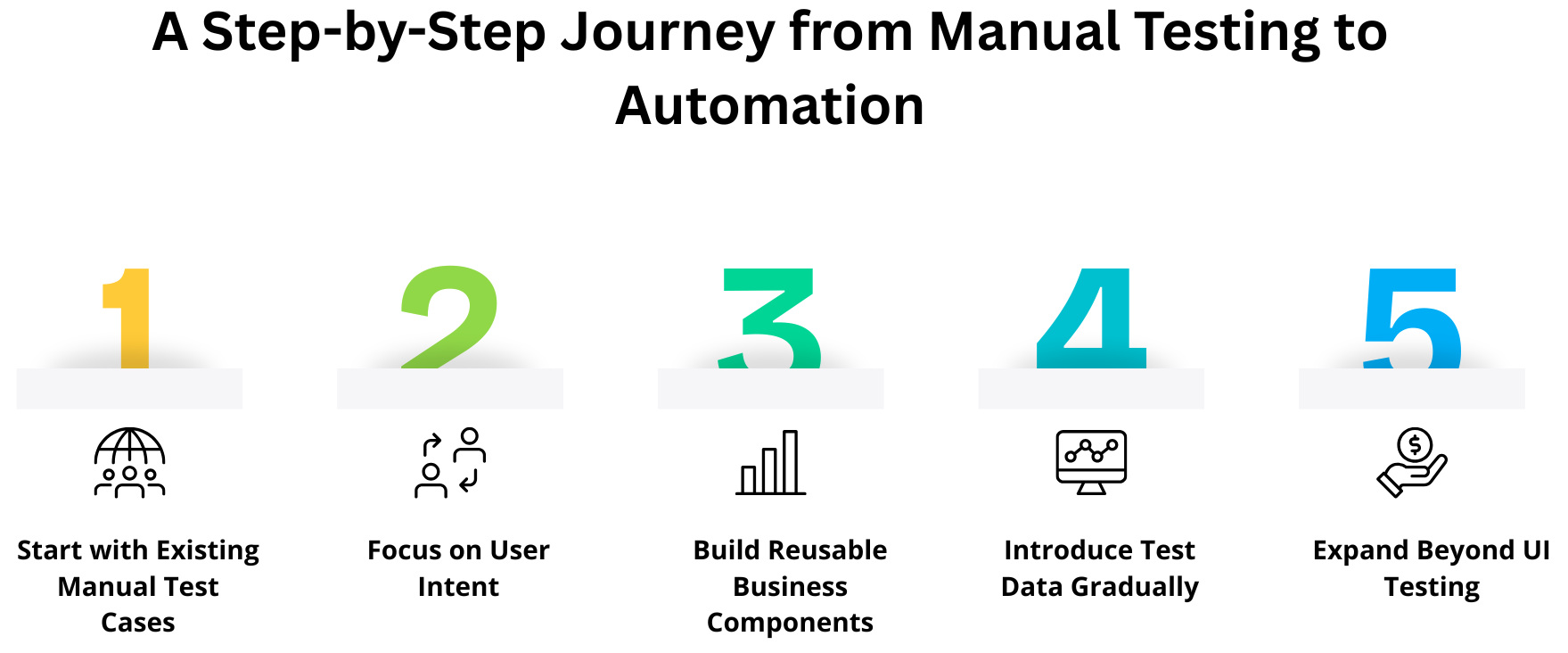
- Step 1: Start with Existing Manual Test Cases: Begin automation with well-documented, frequently run regression test cases like login, registration, checkout, or password reset. Stable and business-critical workflows also provide quick wins and help testers learn automation without starting from scratch.
- Step 2: Focus on User Intent: Describe actions from the user’s perspective instead of browser or programming details. Business-friendly steps like
Click "Submit"orEnter "John" into "Username"make it easy for testers, developers, and business stakeholders to read and review the automated tests. - Step 3: Build Reusable Business Components: Convert standard operations like login, customer creation, or order placement into reusable automation pieces. Reuse of these building blocks results in less duplication, easier maintenance, and enables the assembly of complex business scenarios much more efficiently.
- Step 4: Introduce Test Data Gradually: Use data sets to separate test logic from test data, not hard-coded values. This allows for a single automated workflow to validate multiple scenarios, thereby increasing the test coverage and making it easy for manual testers to add new test cases without changing the automation logic.
- Step 5: Expand Beyond UI Testing: Once comfortable with UI automation, extend validation across APIs, databases, emails, PDFs, mobile apps, accessibility, and other system components. This enables true end-to-end automation that verifies complete business processes rather than just user interface interactions.
Automation Examples for Manual Testers
Manual testers already execute many business workflows repeatedly as part of their daily testing activities. These familiar scenarios are excellent candidates for automation because they are well understood, stable, and frequently included in regression testing. By automating these workflows, testers can quickly see the value of automation without needing extensive programming knowledge.
Example 1: User Registration
A typical registration flow includes entering user details, submitting the form, verifying successful registration, and confirming that a welcome email is received. This end-to-end business scenario can be automated with simple, user-focused steps while validating both the application and its supporting services. Read: How to simulate login action using testRigor?
Example 2: Password Reset
Password reset automation can validate the complete recovery process, including the Forgot Password flow, email delivery, reset link validity, and successful login with the new password. Automating this frequently executed workflow improves reliability and saves significant manual effort.
Example 3: Shopping Cart
An automated shopping cart test can verify product search, cart updates, discounts, coupons, taxes, shipping costs, and successful payment confirmation. Since manual testers already understand these business rules, they can easily translate them into comprehensive automated regression scenarios.
Read: E-Commerce Testing: Ensuring Seamless Shopping Experiences with AI.
Example 4: Insurance Claim Processing
Insurance claim automation can cover the complete business workflow, from policy creation and claim submission to document upload, approval, settlement, and notification. Because the focus is on business processes rather than technical implementation, this type of scenario is well suited for modern intent-driven automation platforms.
These are just the starter scenarios, with correct and intelligent tools, even AI features, chatbots, graphs, images testing, even mainframe testing is super easy.
AI is Changing the Learning Curve
In traditional automation, manual testers had to spend months learning programming languages, automation frameworks, locator strategies, build tools, version control, and debugging before they could create reliable automated tests. Such a steep learning curve delayed productivity and limited automation to a handful of specialized engineers.
The complexity of this process is greatly reduced by AI-driven automation, allowing testers to describe user behavior rather than implementation details. AI doesn’t replace testing expertise; it enhances it by helping testers build, maintain, and scale automation faster, and empowering organizations to extend automation ownership across the entire QA team.
Read: Is AI Empowering or Hurting Manual QAs?
How testRigor Helps Manual Testers Automate Faster
AI has democratized automation, but not all automation platforms are eliminating the barriers in the same way. A lot of AI-assisted tools still expect the testers to know programming concepts, framework structures, locator strategies, or scripting languages before they can become productive. testRigor is based on a different philosophy: to enable manual testers to automate software with the knowledge they already have.
- Plain English Test Creation: Manual testers shouldn’t have to learn programming before building automation. testRigor allows tests to be written in plain English, so automated tests closely resemble existing manual test cases and are easy for the entire team to understand.
- No Dependency on Fragile Locators: Traditional automation depends on XPath, CSS selectors, and element IDs that frequently break when the UI changes. testRigor uses AI context and Vision AI to identify elements the way users interact with them, greatly reducing maintenance caused by locator changes. Read more on AI at testRigor.
- AI-Assisted Test Maintenance: Maintaining automation often requires more effort than creating it because every UI update can break existing tests. testRigor’s AI automatically adapts to many application changes, allowing teams to spend less time fixing tests and more time expanding automation coverage. Read: How to decrease Test Maintenance Time by 99.5% with testRigor.
- Beyond UI Automation: Business workflows extend far beyond clicking buttons on a webpage. testRigor enables manual testers to validate APIs, databases, emails, PDFs, file downloads, mobile applications, authentication flows, and other end-to-end processes within a single automated test.
- Reusable Business Workflows: Common business processes such as login, checkout, customer registration, and approval workflows can be created once and reused across multiple test cases. This minimizes duplication, simplifies maintenance, and allows teams to scale automation much more efficiently.
- Built for the Entire QA Team: Automation should be accessible to everyone involved in quality, not just automation engineers. Since testRigor uses natural language, manual testers, developers, product owners, and business analysts can all read, review, and contribute to the same automated tests.
- Empowering Manual Testers Instead of Replacing Them: Manual testers already possess deep business knowledge, understand customer workflows, and know where defects are most likely to occur. By removing the need for extensive programming, testRigor enables them to transform that expertise into reliable automation much faster, helping organizations increase automation coverage without increasing technical complexity.
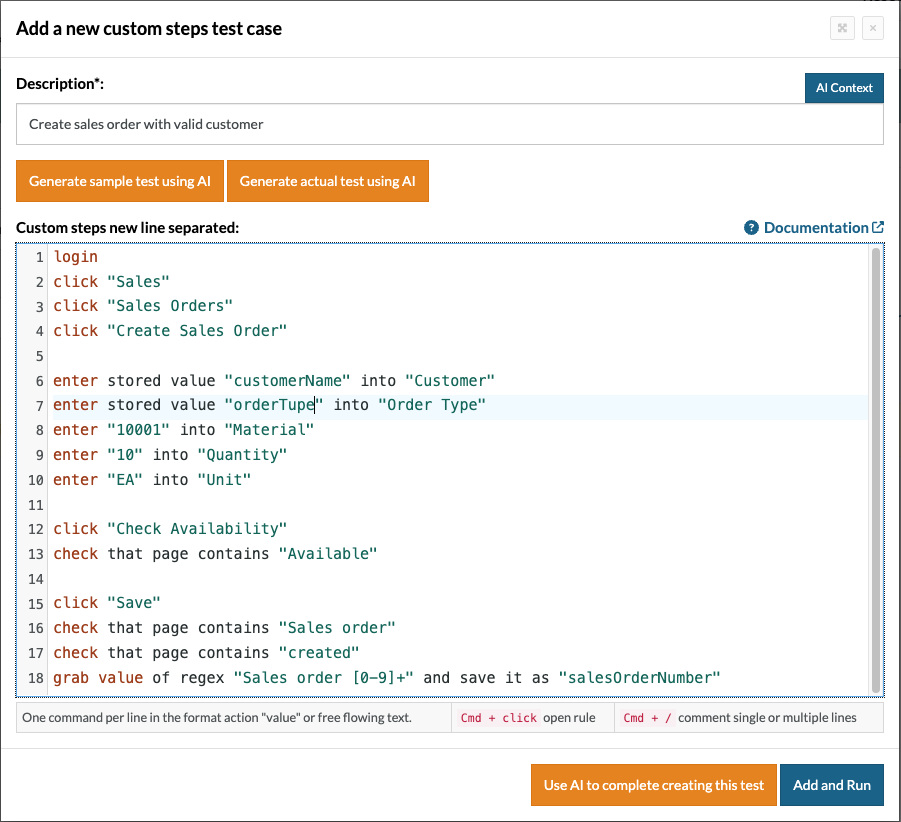
To understand how easy it is to create test scripts in testRigor, let’s see an example test case for Sales order creation for a valid customer.
login  //Resusable Rule
click "Sales"
click "Sales Orders"
click "Create Sales Order"
enter stored value "customerName" into "Customer"
enter stored value "orderType" into "Order Type"
enter "10001" into "Material"
enter "10" into "Quantity"
enter "EA" into "Unit"
click "Check Availability"
check that page contains "Available"
click "Save"
check that page contains "Sales order"
check that page contains "created"
grab value of regex "Sales order [0-9]+" and save it as "salesOrderNumber"
For the above example, using testRigor, we can create reusable rules, which help to reduce the test case steps count, and also, using stored value test data, we don’t have to hardcode test data every time, thereby increasing the modularity. Moreover, testRigor supports built-in reusable rules for Salesforce for quick test automation.
We already have a strong case study from IDT Corporation that demonstrates what is possible when organizations empower their existing manual testers instead of relying solely on specialized automation engineers.
Using testRigor, the company increased automation coverage from 34% to 91% in under nine months and reduced test maintenance to less than 0.1%. It enabled manual testers to build automation while continuing their regular QA responsibilities, resulting in a 7× ROI.
Learn more about the IDT case study: How IDT Corporation went from 34% automation to 91% automation in 9 months.
Building a Culture of Automation
It’s not technology that empowers manual testers. It’s culture.
Organizations are most successful when automation is not viewed as a specialized role but rather a shared responsibility. We should encourage manual testers to collaborate, to work together, and confidently automate the scenarios they know best. This transition can be supported through mentoring, reusable assets, and code or test reviews as needed.
Also important is celebrating small wins. A tester takes a meaningful step toward growing the team’s automation capabilities when they automate their first regression workflow. As confidence grows, so does the complexity of scenarios that they can automate.
By embedding automation into daily testing rather than as a separate activity, teams can achieve broader coverage, reduce repetitive manual work, and boost release confidence.
All of this without requiring every tester to become a software developer.
Frequently Asked Questions (FAQs)
- What is the difference between low-code and no-code test automation?
Low-code test automation provides visual tools and reusable components while still allowing custom scripting when needed. No-code test automation eliminates programming altogether, enabling users to create automated tests through graphical interfaces or plain-language instructions.
- How do AI-powered testing tools reduce flaky tests?
AI-powered testing tools use intelligent element recognition, adaptive waits, and self-healing capabilities to reduce failures caused by UI changes, timing issues, and unstable locators. This results in more reliable automated tests and lower maintenance effort.
- Which types of applications can be automated using modern testing platforms?
Modern automation platforms can test web applications, mobile apps, desktop software, APIs, databases, email workflows, PDFs, mainframes, and cross-platform business processes. Many also support end-to-end validation across multiple systems within a single test.
| Achieve More Than 90% Test Automation | |
| Step by Step Walkthroughs and Help | |
| 14 Day Free Trial, Cancel Anytime |