
Test Artifacts: Meaning, Types, and Best Practices
 |

Have you ever stepped on a loose cable and gotten tangled in it in the dark? It’s a painful reminder of the importance of organization. Your test artifacts are no different. If left unmanaged, they can become a tangled mess that will trip up your testing efforts and cause unexpected delays.
| Key Takeaways: |
|---|
|
In this blog post, we’ll explore practical tips and strategies to tame the chaos. We’ll discuss everything from naming conventions to version control. Everything you need to ensure your test artifacts are well-behaved and ready to support your testing endeavors.
So, let’s roll up our sleeves and get to work.
What are Test Artifacts?
Test artifacts can be viewed as a tester’s treasure trove. A tester is like a detective in the world of software who is always collecting and analyzing artifacts to ensure a flawless product. Like a detective who will gather evidence, analyze clues, and document findings, a tester documents various facts as well.

Test artifacts are essential documents, records, and outputs created during the software testing life cycle. They serve as a means of communication among team members and stakeholders, help ensure quality and compliance, and provide a historical record of the testing activities. Think of them as the breadcrumbs that lead you back to the source of a bug or a performance issue.
Test artifacts provide a structured way to plan, execute, track, and evaluate the testing activities. Do not think of artifacts as just paperwork; they are essential tools for teams to maintain accountability, clarity, and traceability.
- Document test strategies and plans
- Define test cases and scenarios
- Record test execution results
- Report defects and issues
- Provide evidence of testing for audits and compliance
In essence, for a well-organized testing process, test artifacts can be seen as the backbone.
Types of Test Artifacts
- Test planning
- Requirements
- Test design
- Test execution
- Test data
- Reporting and maintenance
- Test plan: A high-level document outlining the overall testing strategy, objectives, scope, approach, resource allocation, schedule, and risks involved in the testing process. The test plan is seen as a roadmap for the testing process.
- Test strategy: A document that defines the overall testing approach. It includes the testing objectives, types of testing to be performed, test environment setup, test data requirements, and exit criteria.
- Test case: A detailed document that specifies a particular test scenario and includes input data, expected output, preconditions, actual results, and test steps. A test case is the most granular level of testing documentation.
- Test script: A set of instructions or code that automates the execution of test cases.
- Test data: The data used to execute test cases includes both valid and invalid data as well as boundary conditions.
- Test report: A document summarizing the results of the testing activities. It usually includes the number of tests executed, passed, failed, and blocked, along with any identified defects.
- Defect report: A detailed document that describes a defect or bug found during testing, with the description, steps to reproduce, the expected/actual behavior, and the severity/priority of the defect.
- Traceability matrix: A document that maps requirements to test cases to ensure that all requirements are covered by test cases and no functionality is left untested. This helps in impact analysis when requirements change.
- Risk assessment: A document that identifies potential risks to the testing process and proposes mitigation strategies.
- Test summary report: A concise overview of the entire testing process that includes overall test results, key metrics, defect statistics, conclusions, and recommendations.
- Test log: A detailed record of test execution, including the date, time, tester, test case ID, test results, and any issues encountered.
- Automation Artifacts: Manual artifacts are not enough to achieve the required results in modern testing environments. Hence, automation artifacts are increasingly gaining importance. Artifacts like test scripts, automation frameworks, and execution logs are classified as automation artifacts, and they enable faster, more reliable testing.
Read: What are Software Testing Strategies? A Complete Guide.
Why are Test Artifacts Important?
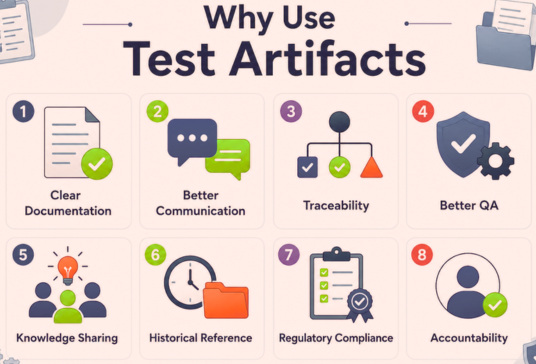
Test artifacts are crucial for successful software testing because they provide a structured way to document and manage the entire testing process.
- What needs to be tested
- How testing will be done
- What are the expected outcomes?
This organization ensures that all requirements are covered and that everyone involved: developers, testers, and stakeholders are on the same page.
By having clear test cases and execution reports, teams can easily identify any defects in the software, which helps improve its quality before it goes live. Additionally, test artifacts serve as a historical record that can be referenced in future projects, which makes it easier to learn from past experiences and improve testing strategies.
Best Practices for Managing Test Artifacts
While it might seem that organizing artifacts isn’t a big deal, the task tends to be overwhelming in the real world, where the influx of artifacts is always high due to the dynamic nature of software development. Here are some tried and tested tips that will help you keep the library organized at all times.
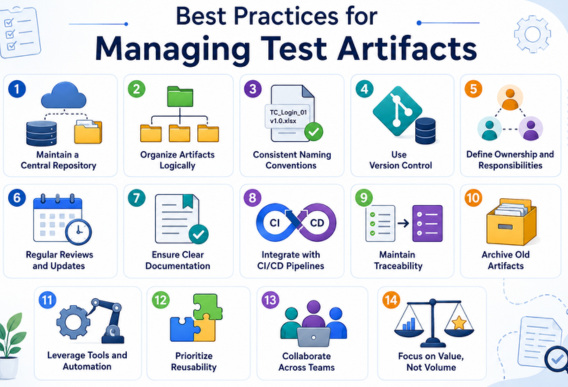
Maintain a Central Repository
It is a good idea to save your test artifacts in a central repository. You can set up access control systems so that people only have the necessary access. Use a test management tool like TestRail or JIRA to store all test artifacts. This allows team members to create, update, and track artifacts in a single location, which improves accessibility and collaboration.
Organize Artifacts Logically
Structuring test artifacts in a logical manner makes it easier for team members to find and access the information they need. This can be done through a hierarchical folder structure or a systematic naming convention.
- Project Name
- Test Plans
- Test Cases
- Test Scripts
- Test Data
- Test Reports
Each folder can contain relevant documents categorized by version or feature.
Consistent Naming Conventions
Develop a consistent naming convention for your test artifacts. Use descriptive names that reflect the content of the artifact. For example, a test case for logging in as an admin might be named TC_Login_Admin. Avoid using vague or generic names like test1.py or data_file.txt.
Use Version Control
By implementing version control for test artifacts, you can track the changes over time. This allows teams to revert to previous versions if necessary and provides a clear history of modifications. Use tools like Git to manage changes in test cases and scripts. For instance, if a test case is modified to reflect a requirement change, the previous version can be stored for the team to reference later. Read: How to Do Version Controlling in Test Automation.
Define Ownership and Responsibilities
Assign specific team members ownership of certain artifacts. This helps ensure accountability and clarity when managing those documents. For example, assign a test lead to be responsible for the test plan, while other team members are designated to maintain specific test cases or defect reports. This ensures that each artifact has a clear point of contact for updates and questions.
Regular Reviews and Updates
Establish a regular review process for test artifacts to keep them current and relevant. This practice also builds continuous improvement within the testing process. For example, you can schedule bi-weekly meetings to review test cases and scripts. During these meetings, team members can discuss any changes in requirements and update artifacts accordingly. This ensures that they remain aligned with the latest project needs.
Ensure Clear Documentation
Well-documented test artifacts make it easier for team members and stakeholders to understand the testing process, criteria, and results. When creating test cases, include clear descriptions, expected results, and prerequisites. For instance, a test case for logging in might document the steps, the expected output (successful login), and the necessary test data (valid user credentials).
Integrate with CI/CD Pipelines
Wherever possible, integrate test artifacts with CI/CD pipelines. It automates testing and ensures that test results are generated consistently and efficiently. If you are using a tool like Jenkins, configure it to automatically run test scripts whenever new code is pushed to the repository. The results can then be reported back to the central repository. This makes it easier to track test outcomes.
Maintain Traceability
Maintaining traceability between requirements, test cases, and defects ensures comprehensive testing coverage and helps identify gaps in testing. You can use a Requirements Traceability Matrix (RTM) to link each requirement to its corresponding test cases. Or, if you are working with project management tools like JIRA, you can do this very easily. This way, if a requirement is changed or added, you can quickly determine which test cases need to be updated or created.
Archive Old Artifacts
The artifact repository should be cleaned periodically. Outdated or irrelevant artifacts should be archived so that the repository is clean and manageable while still preserving critical historical data. When the project ends, all test artifacts should be moved into an archive folder. To ensure that the current projects have a streamlined workspace, the archived folder can be labeled with the project name and dates.
Leverage Tools and Automation
Use test management tools to store and organize artifacts, track execution of test suites, and generate relevant reports. Using tools and automation reduces manual effort and improves accuracy.
Prioritize Reusability
Design artifacts so they can be reused across projects. For this purpose, modularize test cases, reuse test data, and utilize shared frameworks. Reusing artifacts saves time and effort in the long run.
Read: How to use reusable rules or subroutines in testRigor?
Collaborate Across Teams
Testing is not an isolated activity. Encourage collaboration between developers, testers, and business analysts. Sharing ownership and responsibilities improves software quality.
Focus on Value, Not Volume
Having too many artifacts does not necessarily mean better testing. Instead, focus on quality over quantity, relevant documentation, and actionable insights.
Challenges in Managing Test Artifacts
- Documentation Overload: The sheer number of test artifacts can overwhelm teams and reduce efficiency.
- Maintenance Effort: Lots of maintenance and continuous effort are involved in keeping artifacts up-to-date.
- Tool Fragmentation: Using multiple tools often leads to scattered information.
- Lack of Standardization: Using different formats can lead to inconsistency and confusion.
Addressing these challenges requires a balanced approach and the right tools.
Future Trends in Test Artifacts
- AI-driven Testing: As AI evolves further, it can generate and maintain test artifacts automatically.
- Shift Left Testing: With shift-left testing becoming a trend, artifacts are created earlier in the development cycle.
- Continuous Testing: Artifacts are integrated into automated pipelines to ensure continuous testing.
- Behavior-Driven Development (BDD): More and more artifacts are written in natural language, improving collaboration.
Final Thought
Test artifacts provide structure, transparency, and accountability to the testing process and are an indispensable part of the software testing lifecycle. They ensure that the testing is thorough and effective.
By managing test artifacts effectively, you can enhance communication, increase efficiency, and ensure that the final product meets user needs and expectations. After all, a well-organized test environment is the foundation of successful testing.
Each test artifact, from high-level strategies to detailed test cases and reports, serves a specific purpose in delivering quality applications.
However, the true value of test artifacts lies in their efficient management and not just in their creation. Teams can maximize their effectiveness by following best practices such as maintaining clarity, ensuring traceability, leveraging tools, and focusing on value.
Frequently Asked Questions (FAQs)
- What is the difference between a test strategy and a test plan?
A test strategy, a high-level document, outlines the overall testing approach, while a test plan is more detailed and project-specific. A test plan covers scope, schedule, resources, and execution details.
- How do test artifacts help in Agile and DevOps environments?
Test artifacts integrate with CI/CD pipelines, enabling continuous testing, faster feedback, and better collaboration among various teams. In Agile and DevOps, test artifacts are kept lightweight and continuously updated.
- What tools are commonly used to manage test artifacts?
Test management platforms like Jira, TestRail, Zephyr, and Azure DevOps are used to manage test artifacts. These tools help organize, track, and maintain test artifacts efficiently.
- Can test artifacts be automated?
Yes, many test artifacts, such as test cases, execution reports, and logs, can be generated and maintained using automation tools. Automation of artifacts reduces manual effort and improves accuracy.
- How often should test artifacts be updated?
Regularly. They should definitely be updated when requirements change, defects are fixed, or new features are added, to ensure they remain accurate and relevant.
| Achieve More Than 90% Test Automation | |
| Step by Step Walkthroughs and Help | |
| 14 Day Free Trial, Cancel Anytime |











