Agentic AI Fundamentals and Architecture
 |
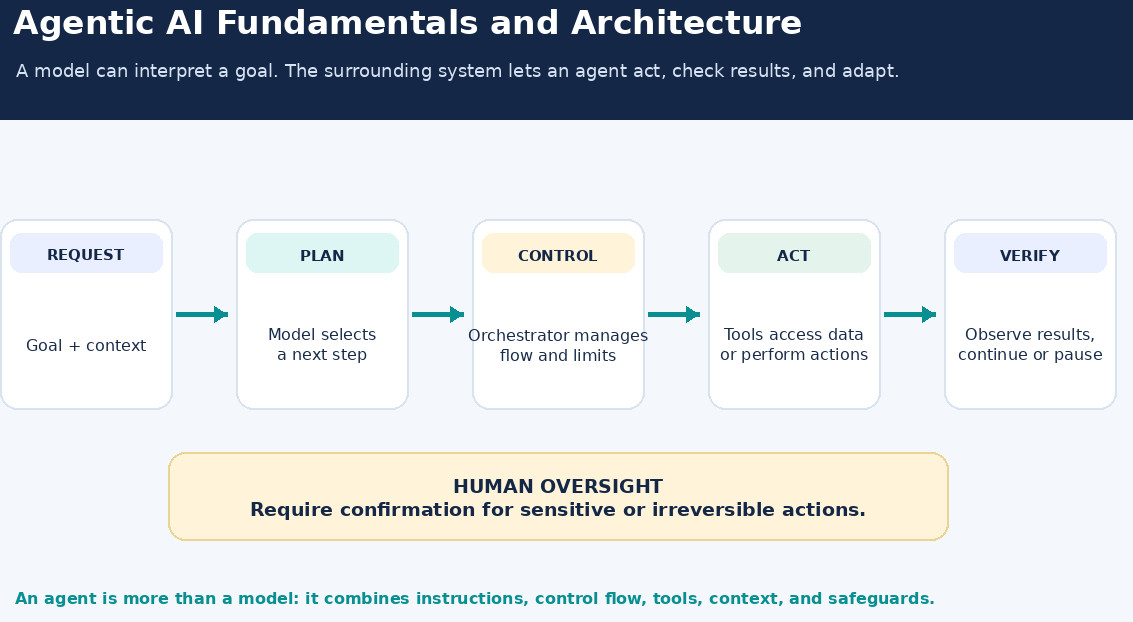
An AI system that is useful is able to answer a question. A more capable system can comprehend a goal, determine what to do next, use tools, verify what happened, and adapt its approach. The second type of system is often referred to as an AI agent.
There’s growing interest in agentic AI because it can help automate tasks that involve multiple steps and may be subject to changing circumstances. But an agent is more than just a chatbot with a longer prompt. It’s a system that connects a model to tools, context, control logic, and safety nets. Before you build one, it’s important to understand these parts and how they work together.
For a comparison of goal-directed AI systems and generative AI, see Agentic AI vs. Generative AI.
| Key Takeaways: |
|---|
|
What is Agentic AI?
There’s no single definition of agentic AI. The term generally refers to artificial intelligence systems that try to reach a goal by making decisions and taking actions, often through tools. They may change what they do as they get new information.
A chatbot usually answers all questions. An agent may have a larger job: to collect data, evaluate choices, modify a record, and report on what it did. It could call a model and tools many times before it reaches a stopping point. To understand how AI assistants and AI agents differ in their capabilities and behavior, read AI Assistants vs. AI Agents.
For example, if someone asks a chatbot, “What is your return policy?”, it can explain the policy. They may ask an online-store agent, “Can I return order 4821?” and the agent may look up the order, check the purchase date and return rules, and explain whether it is eligible. If the user asks to start the return, the agent can prepare the request and ask for confirmation before submitting it.
- In a fixed workflow, software defines the sequence of steps in advance. For example, a form-processing system might always extract an invoice number, check required fields, and send incomplete invoices to a reviewer.
- In an agent, the model can choose or adjust steps based on the task and the results it receives. For example, if an order lookup fails because the customer gave an email address instead of an order number, the agent might search by email or ask for another detail.
These approaches can be combined. A system can use fixed steps for predictable parts of a task and let an agent make decisions where the path is less certain. For a broader comparison of agentic AI, AI agents, and autonomous AI, see Agentic AI vs. AI Agents vs. Autonomous AI.
Agentic Does Not Mean Fully Autonomous
An agent can operate with different levels of independence. It might suggest an action for a person to approve, or take low-risk actions itself while requiring approval before a financial or irreversible change.
The right level of autonomy depends on the tools available, the consequences of an error, and the amount of human judgment required. For instance, an agent might automatically categorize a support ticket, but ask a support representative to approve a refund above a defined amount. For a closer look at the difference between an AI system’s ability to act and its level of independence, read AI Agency vs. Autonomy.
The Agent Loop: Decide, Act, Observe
- Receive a goal and the context needed to understand it.
- Choose the next step or identify missing information.
- Use a tool to take action, or produce a response.
- Observe the result.
- Decide whether to continue, ask for help, or stop.
Imagine a staff-support agent who needs to submit a leave request. It can check the employee’s leave balance and policy, collect the requested dates, prepare the request, and show the details for confirmation. If the employee confirms, it submits the request and reports the result. If there are missing dates or insufficient balance, it should ask a question or explain the issue instead of guessing.
This cycle of thought, action, and observation is core to the design of agents. The ReAct research paper mentions that a model is forced to interleave reasoning and action steps, and then update its plan based on information from external sources.
The loop also needs clear ending conditions. The agent may stop because it completes the task, it cannot continue without more information, it hits some step or time limit, or it encounters some problem that needs human intervention.
An agent with no limits might retry a failed lookup, or spend more money than necessary, or continue working after it should have stopped.
Core Components of an Agent Architecture
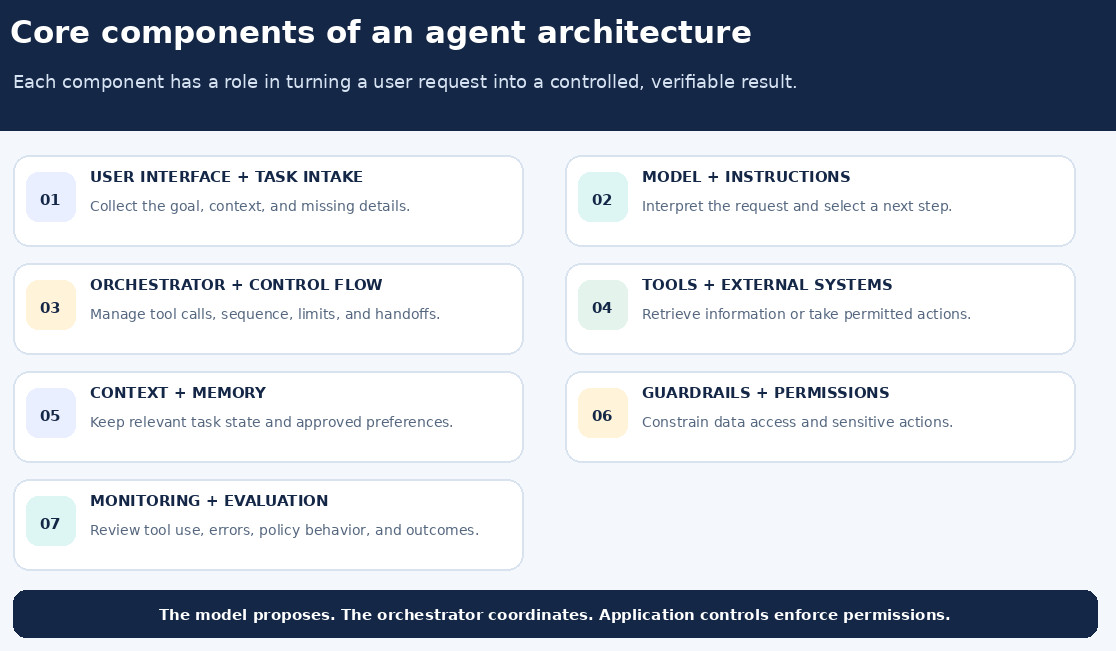
An agent is best seen as a system of interrelated components. The model is important, but it’s not self-running. So a leave-request agent, for instance, needs an interface to collect dates, a model to interpret the request, an orchestrator to manage steps, tools to check and submit the request, and controls to prevent an unconfirmed submission.
User Interface and Task Intake
The interface is where a person or another system gives the agent a request. The agent needs to identify the goal, the information provided, and whether it has enough detail to begin.
If a request is ambiguous or missing a critical detail, asking a follow-up question may be safer than guessing. For example, “Schedule a meeting with Alex” may require clarification if several people named Alex are in the directory. Similarly, a travel agent asked to “book the usual hotel” may need to confirm the destination and dates if they are not available in the current context.
Model and Instructions
The language model interprets the task, selects from available options, and produces a response or structured instructions for the surrounding application. Instructions define the agent’s role, boundaries, and behavior when uncertain. Application controls determine which tools it can access and how those tools operate.
For example, a shopping-support agent’s instructions might ask it to explain the return policy, look up an order when needed, and ask for confirmation before creating a return. Those instructions guide the model, while the application should separately prevent the agent from submitting a return without the required confirmation.
Orchestrator and Control Flow
The orchestrator manages the agent’s run. It sends the model the current task and relevant context, handles its response, runs permitted tool calls, returns results to the model, and checks whether the agent should continue or stop.
For a leave request, the orchestrator might allow the agent to check the employee’s balance and policy first, then prepare a request, and finally require a confirmation step before submission. It can also enforce limits such as maximum steps, timeouts, approval checkpoints, and error-handling rules.
Tools and External Systems
Tools connect the agent to information or actions outside the model, such as search, databases, business applications, code execution, or APIs. Each tool should have a clear purpose, defined inputs, and limited permissions. For example, an order-lookup tool should not automatically be able to cancel an order.
A support agent might have separate tools to look up an order, check return eligibility, and create a return. Keeping these actions separate makes it easier to grant only the access needed at each step and to require confirmation before a consequential action.
Context and Memory
AI context helps the agent track the task and make informed decisions. It may include the current request, earlier messages, relevant documents, tool results, and task progress. Short-term context supports the current task, while long-term memory can retain details such as user preferences across sessions. The system needs to control what it stores and who can access it.
For example, during a single hotel-booking task, short-term context could retain the destination, travel dates, and options already compared. A longer-term preference might record that a user prefers hotels near public transit. The system should store that information only if it is designed to do so and the user has appropriate notice and controls.
More context is not always better. Irrelevant, outdated, or untrusted information can confuse the model or influence its actions. Good context management selects what is needed for the next step and avoids passing sensitive data unnecessarily. If an old profile says a user prefers a particular city, but the current request names a different destination, the agent should follow the current request or ask for clarification.
Guardrails and Permissions
Guardrails limit what an agent can do and how it handles information. They can include input checks, tool permissions, data-access rules, approvals, and output checks. These controls are especially important when an agent encounters misleading instructions in a document or webpage, a risk known as prompt injection, or when it can access private data.
For example, a support agent reading a customer-provided message should treat instructions inside that message as content to assess, not as authority to reveal other customers’ data. A payment agent could prepare a payment for review while the application requires an authorized person to approve it before execution.
Structured inputs and outputs, restricted access, and human approval for sensitive actions can reduce risk, though they cannot eliminate it entirely.
Monitoring and Evaluation
A production agent needs logs that let teams review its inputs, decisions, tool calls, results, errors, and final responses while protecting sensitive data. Evaluation should check not only the final answer, but also whether the agent chose appropriate tools, followed permissions, used reliable information, recovered from errors, and stopped appropriately.
For example, in a test of a returns agent, a successful outcome is not simply a polite final message. Evaluators should also check that it looked up the correct order, applied the correct return window, did not submit a request without confirmation, and handled an unavailable order record sensibly.
Common Agent Architectures
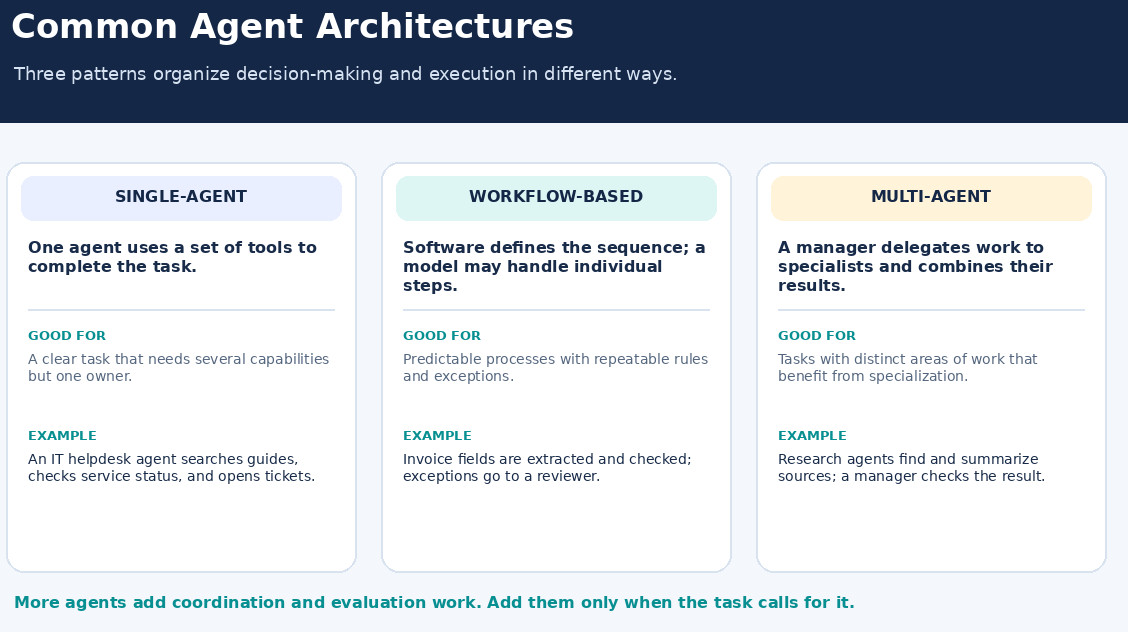
Agentic systems can be organized in different ways depending on the task, the decisions required, and how much flexibility the system needs. Some use one agent with a set of tools, while others rely on predefined workflows or several agents working together. Each approach has different trade-offs in complexity, control, and coordination.
Single-Agent Architecture
One agent uses a set of tools to handle a task. This is often a sensible starting point because it keeps the system easier to build, inspect, and evaluate. Developers can add capabilities as needs emerge without introducing coordination between multiple agents.
For example, one IT-helpdesk agent could search approved troubleshooting guides, check service status, and create a support ticket. It can use different tools while keeping one agent responsible for the complete interaction.
Workflow-Based Architecture
A workflow uses predefined steps, such as classifying a request, retrieving information, drafting a response, and checking the result. Software controls the sequence, even when a model handles some individual steps.
This approach can fit a task with a predictable sequence. A document-processing system, for instance, might extract fields from every invoice, validate them against fixed rules, and send exceptions to a reviewer. The model can help read a poorly formatted invoice, while the workflow still determines what happens next.
Multi-Agent Architecture
A multi-agent system divides work among agents. A manager may assign tasks to specialists and combine their results, or agents may hand work to one another.
For example, a research assistant might use one agent to find relevant documents, another to summarize them, and a manager agent to check that the summary answers the original question. This arrangement may help when the work has genuinely separate areas of expertise. It also adds coordination, evaluation, and monitoring challenges. More agents do not automatically make a system more capable; teams should have a clear reason for adding them.
Design Principles for Dependable Agents
A useful agent architecture starts with the boundaries of the task, not the number of agents or tools. Teams should decide what the system is allowed to do, what it must check, and when a person needs to take over. For a refund agent, that could mean allowing it to check eligibility and prepare a refund, while requiring a person to approve refunds above a set threshold.
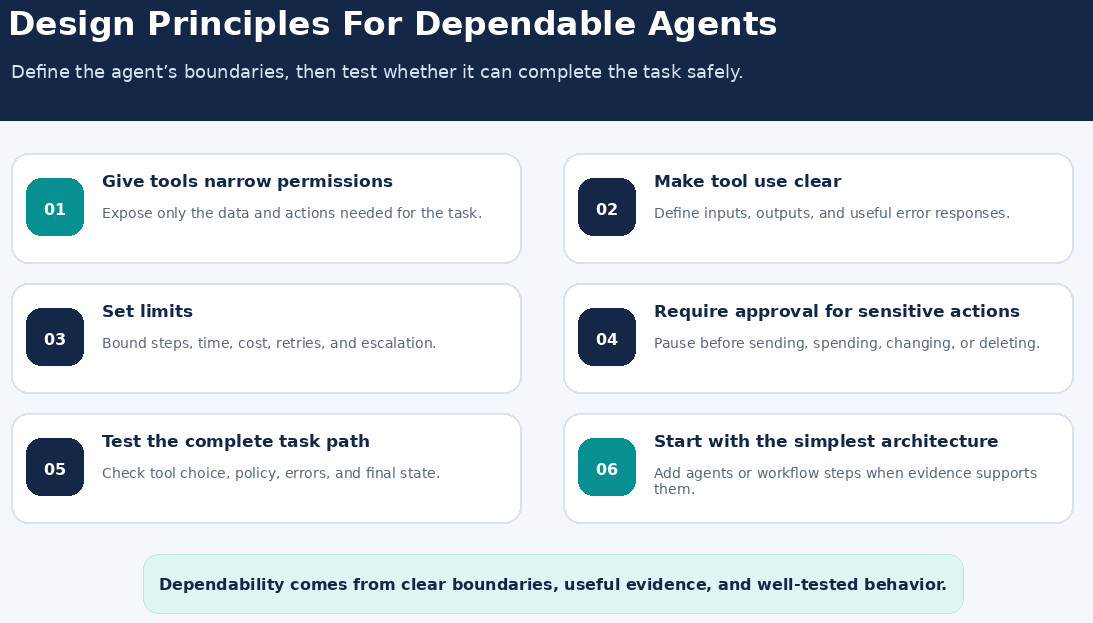
- Give tools narrow permissions. Provide access only to the data and actions needed for the task. A calendar assistant that finds open times may need read access to calendars, but not permission to delete events.
- Make tool use clear. Tool descriptions and input requirements should make the intended use easy to understand. A lookup_order tool should specify whether it accepts an order number, an email address, or both.
- Set limits. Define step, time, and cost boundaries, along with conditions for stopping or escalating. If an address lookup fails twice, the agent could ask the user to check the address rather than repeat the same search.
- Require approval for sensitive actions. Consider confirmation before sending messages, changing records, spending money, or performing irreversible operations. An agent can draft a customer email, for example, while leaving the send action to a human reviewer.
- Test the complete task path. Evaluate tool selection, policy compliance, error handling, and final results. A booking test should check that the agent uses the requested dates and obtains confirmation before making a reservation.
- Start with the simplest architecture. Add workflow steps or specialized agents when observed failures or requirements justify them. A single support agent may be enough until evaluations show that separate specialist agents improve results.
The quality of the surrounding tools and controls can matter as much as the choice of model. Clear tool definitions, useful error messages, and safeguards against invalid actions can make an agent easier to operate reliably.
When to Use an Agent?
- Involves several steps and requires decisions along the way.
- Uses tools or information that can change during the task.
- Has outcomes that can be checked against clear criteria.
- Benefits from adapting its approach when results differ from expectations.
For example, helping an employee investigate an access issue may require checking current service status, searching the approved troubleshooting guide, and adapting the next step based on what the employee has tried. That may benefit from agentic behavior. By contrast, calculating a fixed allowance from known inputs may be better handled by a deterministic function or workflow.
A fixed workflow may be the better fit when the task follows a stable sequence or requires exact, repeatable behavior. Agentic systems can involve trade-offs in cost, latency, and reliability, so teams should use the simplest design that meets the need and add flexibility only where it helps.
For a broader discussion of how to evaluate agent behavior, safety, and task outcomes, read Agentic AI Testing.
Automated Tests for AI-Powered Features
- Chatbot and LLM testing: testRigor can automate chatbot interactions and use AI-based validations to check response meaning or intent when the exact wording varies. Read Chatbot Testing Using AI and LLM Testing for related approaches.
- AI-generated content testing: testRigor supports testing AI-generated summaries and images, with AI-based checks for generated content. See How to Use AI to Test AI and Images Testing Using AI for more detail.
- MCP integration: Through its MCP server, testRigor can connect with compatible AI assistants that create or update test cases, run tests, and review results or failures. This is an AI agent helping with test automation, which is different from testing an AI agent in an application. See How to Utilize testRigor’s MCP Server.
- Cross-platform and integrated testing: A single test can combine browser steps, mobile actions, and API calls as part of a broader workflow. Read Cross-platform Testing: Web and Mobile in One Test for an overview.
AI-based validations need clear criteria and review, since an AI assessment can be mistaken. These features can test user-facing behavior and help automate test workflows, while checks of internal tool calls, permissions, execution traces, and security may require additional methods.
Conclusion
Agentic AI combines a model’s ability to interpret and plan with tools that let it interact with external systems. The model may choose what to do next, but the orchestrator, context, permissions, and stop conditions determine how that choice becomes action.
For organizations, the practical goal is not maximum autonomy. It is a system that can complete a well-defined task, show how it did so, and recognize when it should pause or ask for help.
Frequently Asked Questions (FAQs)
- How can a team measure the return on investment of an agentic AI project?
Compare the time, cost, or error rate of the current process with the same measures after deployment. Include implementation, model usage, integration, monitoring, and human review costs to understand the full impact. Track these measures over time to see whether the agent continues to deliver value as usage grows.
- What skills does a team need to build and maintain an AI agent?
Teams may need software engineering, API and systems integration, data and security knowledge, evaluation design, and expertise in the business process the agent will support. The mix depends on the agent’s tools and level of responsibility. Teams should also plan for ongoing monitoring and updates as systems, policies, and user needs change.
- How should an organization introduce an AI agent to employees or customers?
Start with a limited pilot, explain what the agent can and cannot do, and provide a clear way to request human help. Gather feedback, review outcomes, and expand access as the system proves reliable. Before a wider rollout, prepare support teams to handle escalations and explain the agent’s decisions.
| Achieve More Than 90% Test Automation | |
| Step by Step Walkthroughs and Help | |
| 14 Day Free Trial, Cancel Anytime |