
Generative AI-Based Testing Certification
Reusable Rules
A reusable rule is a step or sequence of steps saved under a name that can be called from a test case.
Reusable rules are useful for actions that are performed frequently across multiple test cases.
Reusable rules can make test cases easier to create, read, and maintain. If the steps inside a rule need to change, you can update the rule once and the change will apply wherever that rule is used. They are also key in involving non-technical, non-testing, or high-level team members (e.g., product managers) into testing.
login
click "Men Clothing"
scroll down
click "Men's cargo shorts"
click "brown"
click "Size 34"
click "Add to cart"
check that page contains "Cart (1)"
Next, go to the Reusable Rules section in testRigor, name the rule add item to cart, assign the label “shopping-cart”, and add the first 7 steps above. Labels are automatically added to test cases that execute the rule, making them easier to organize and filter.
add item to cart
check that page contains "Cart (1)"
- Save: Saves the rule and its steps.
- Save, then Find and Update Name: Saves the rule and, if its name has changed, finds test cases using the old name and updates them with the new one.
- Save, then Find and Replace Steps: Finds test cases containing the same sequence of steps and lets you replace those steps with a call to the reusable rule.
Replacing repeated steps with reusable rules makes maintenance easier. When you update a rule, the changes automatically apply to every test case that uses it, so you don’t have to update each test case individually.
Note: You can also use reusable rules within other reusable rules.
Built-in rule
testRigor has a built-in rule called login, which uses credentials stored in Settings->Authentication->App-specific Authentication. Alternatively, if the user adds the variables username and password to the test data, either global or data set, those will override the credentials in the settings.
Another very common way to parameterize logging in would be setting the variable before executing the rule as follows:
save stored value "customUser" as "username"
save stored value "customUserPwd" as "password"
login
testRigor’s login rule is flexible in the sense that it figures out how to login for most login scenarios regardless of the individual steps that different user flows may have. The exception where the login rule may struggle is when there are several types of users (e.g., admin, non-admin, etc) and one must be selected on the login screen before entering a username and password. Even in this case, if the user type is selected first, the login rule should work if entered after.
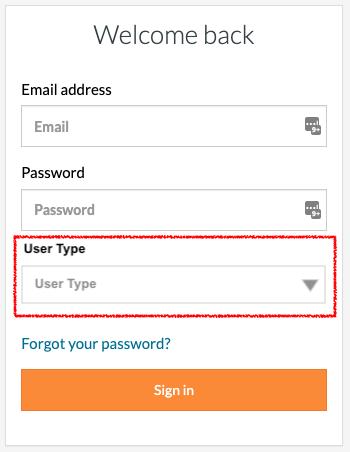
Parameterized reusable rules
Sometimes you may want to reuse the same sequence of steps but with different values. Instead of creating a separate rule for each set of values, you can create a parameterized reusable rule.
save stored value "customUser" as "username"
save stored value "customUserPwd" as "password"
loginsign in as "customUser" using "customUserPwd" as the password"customUser" and "customUserPwd" act as parameters.sign in as "[email protected]" using "abcd1234" as the password"customUser" is replaced with "[email protected]" and "customUserPwd" is replaced with "abcd1234" when the rule executes.sign in as stored value "user1" using stored value "user1Pwd" as the passwordBest practice: Sensitive information such as passwords should be stored using hidden variables in test data so that their values are not revealed.
Auto-apply rules
Auto-apply rules help handle unpredictable events, such as ads or popups that may appear at different points during a test.
To create one, open the “Fields related to auto-apply rules and auto-discovery” section below the reusable rule’s steps and enable “Auto apply on every step of every test case.”
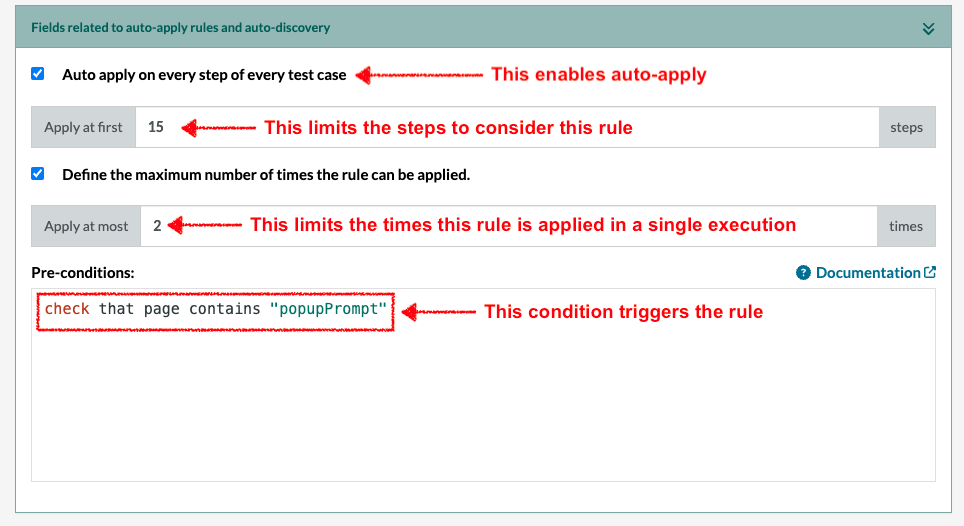
Next, define a precondition that triggers the rule. This could be something unique to the popup, such as its text or container name.
You can control how long testRigor checks for an auto-apply rule and how many times the rule can run.
Apply at first: Defines how many test steps testRigor should check for the rule’s precondition. For example, a value of “20” means testRigor will check the first 20 steps. A value of “0” is a special case, meaning testRigor will continue checking for the precondition throughout the entire test case, no step limit.
Step 1 → Is popup here? No
Step 2 → Is popup here? No
Step 3 → Is popup here? No
...
Step 20 → Is popup here? No
Step 21 → Stop looking for the popup
Step 100 → Is popup here? NoStep 1 → Is there a popup here? No
...
Step 5 → Popup appears → close it (1st time)
...
Step 12 → Popup appears → close it (2nd time)
↓
Maximum reached → stop looking for the popup
So even if you told testRigor to check for the popup for all 100 steps, after it has closed the popup twice, it stops checking.
AI-Based Reusable Rules
testRigor allows you to create reusable rules using AI, without having to manually define every step. Instead, you can describe what you want to accomplish in plain English, and testRigor will use AI to generate the steps needed to perform that action.
Register an accountWhen you execute the test, testRigor will recognize that the action is not an existing command or reusable rule and prompt you to create an AI-based rule. Once confirmed, testRigor will use AI to generate the steps needed to register an account .
You can find the generated rule in the Reusable Rules section, where the AI-based rule checkbox will be enabled.
If you want to manually edit the generated steps, you can uncheck AI-based rule and modify the steps yourself.
Alternatively, you can create an empty reusable rule without any steps. This is useful when planning test scenarios before implementing the automation, allowing someone else to fill in the steps later.
This flexibility allows you to start with AI-generated automation, define your own steps, or leave rules empty until they are ready to be implemented.
Note: When creating reusable rules, try to use consistent and standardized language. This makes the rules easier for everyone on the team to understand and helps avoid confusion.
Managing test case dependencies with reusable rules
Test Case 1: Create a new customer account
Test Case 2: Place an order using that customer account
Test Case 2 depends on Test Case 1 because the customer account must exist before an order can be placed. Therefore, the tests must run sequentially: Create customer → Place order
Whenever possible, testRigor recommends using test suite hooks or API calls to perform the required setup instead. For example, the required customer could be created through an API before the order test begins. This makes the test independent of another test case.
Test Case 1: Create customer through API → Test placing an order
Test Case 2: Create customer through API → Test updating an order
Test Case 3: Create customer through API → Test cancelling an order
These tests do not need to wait for one another and can run at the same time, reducing the total execution time.
If dependencies between test cases are necessary, an entire test case can be converted into a reusable rule. The rules can then be called sequentially within another test case to ensure they execute in the required order
login
create customer
place customer order
process customer payment